Get started
How Tracehold works
What happens to every tool call, from the agent to your cloud and back.
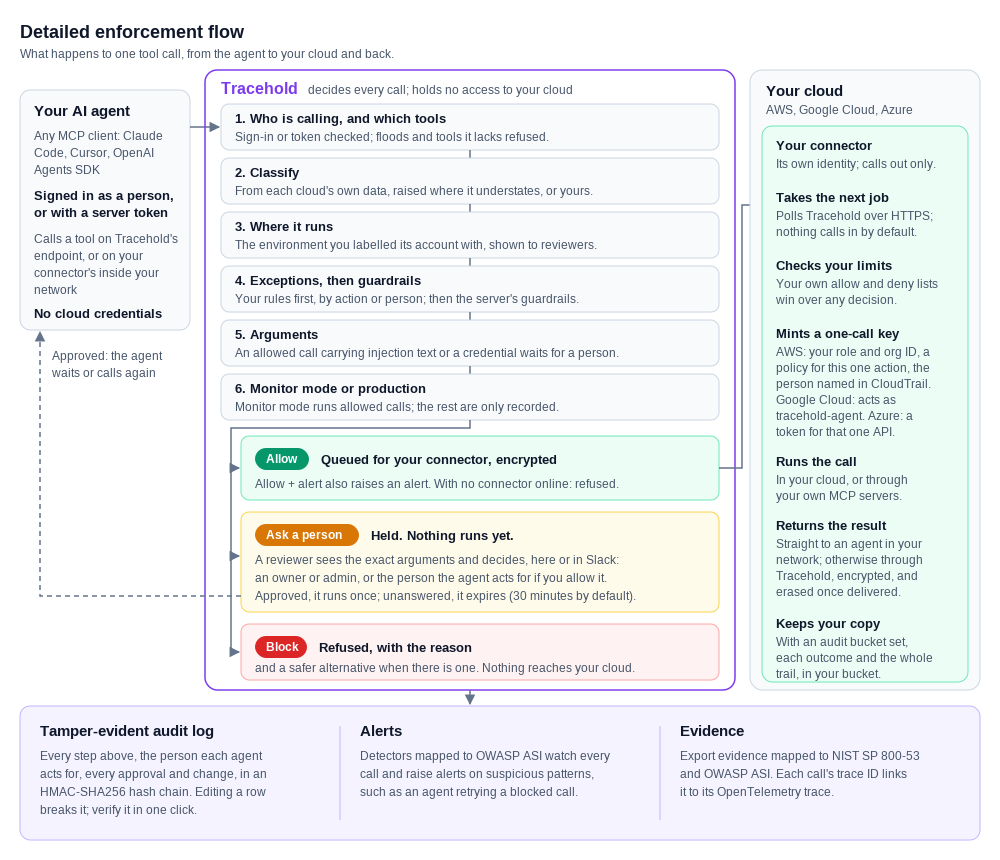
One call, step by step#
The diagram above follows one tool call. Tracehold makes six checks, in this order:
Who is calling, and which tools
For a server people sign in to, the access token of an agent signed in as a person, checked again against that person (still on the team, not a viewer); for a pipeline's server, the server's token. Then the session. The server's and the organization's rate limits apply (the first refusal each minute is recorded in the audit trail). Only the tools enabled on the server can be called. If Redis is down, your fail mode decides whether calls are refused or decided without the rate checks.
Classify
The action identifier (e.g.
aws:s3:DeleteBucket) gets a risk level: your organization's own if it set one, else Tracehold's reviewed rating for the 545 common actions, else the cloud's own data (AWS publishes an access level for every action; Azure, Google Cloud and Kubernetes name what each operation does), raised where that understates the risk, such as turning off logging or reading secrets. Tracehold's own tools run actions on AWS, Google Cloud and Azure; Kubernetes, Cloudflare, Datadog, GitHub and Terraform are observe only. Tools from your own MCP servers are rated by name (call_awsby the AWS command it carries). An unknown action counts as Destructive, so in production it waits for a person rather than being silently allowed. See Risk levels.Where it runs
The environment of the account the call runs in, as you labelled it on the Connectors page (production, staging or development), and whether the action can be undone. Calls carry no resource tags, so Tracehold estimates nothing more. See Where a call runs.
Exceptions, then guardrails
Exceptions are matched first (by action, provider, environment, or the person an agent acts for), then the server's guardrails decide: allow, allow and alert, ask a person, or block.
Arguments
An allowed call whose arguments carry injection text or a plaintext credential goes to a person instead (OWASP ASI01).
Monitor mode or production
In monitor mode an allowed call runs; a call production would hold or block is recorded and stops there: it does not run and nobody is asked. In production every decision takes effect. Switch a server between them on its page.
What each decision does#
- Allow: the call becomes a job, encrypted, for your connector, the only thing that ever acts in your cloud. The connector mints a key for that one call with its own identity (AWS STS with a session policy naming only that action, Google service account impersonation, an Azure token for one API), runs it and reports the outcome; Tracehold records the key's scope, never the key. How tightly each cloud's key is scoped: Credentials and scope.
- Ask a person: the call is held; nothing runs. An owner or admin decides in Tracehold or Slack (or the person the agent signed in as, if your organization allows it). The agent waits for the decision or repeats the identical call, and it runs once (Approvals).
- Block: refused, with the reason and a safer alternative when there is one.
Every decision, approval, rejection and execution, and every change people make to guardrails, exceptions and server modes, is appended to an HMAC-SHA256 hash chain.
Tracing a call#
Every call carries a trace ID, shown on its action page as OTel Trace ID and in its audit entry. Quote it to Tracehold support to follow the call through each stage.
Failure modes#
A call Tracehold cannot decide never runs: the connector runs only jobs Tracehold created for a decision. The error is written to the audit chain and the server log, and the agent is told to retry. See Fail mode.
No token can be checked, so the request fails. Nothing executes and nothing is recorded until the database is back.
Unrecognised actions are treated as DESTRUCTIVE, so in Production they require approval. Never silently ALLOW.
Allowed actions are recorded but not run, and the agent is told what is missing.
Nothing runs: allowed calls are refused and the agent is told no connector is online. An approved call is not used up: if a connector is back within 15 minutes of the approval, the agent repeats the call (or keeps waiting) and it runs once.